
An abundance of productivity.
Abundio is a home base for project-centric, AI-assisted development — run your shells, your editor, your git workflow, and your coding agents side by side, all scoped to the project you're working on.
- macOS · Windows · Linux
- Native desktop, built with Tauri
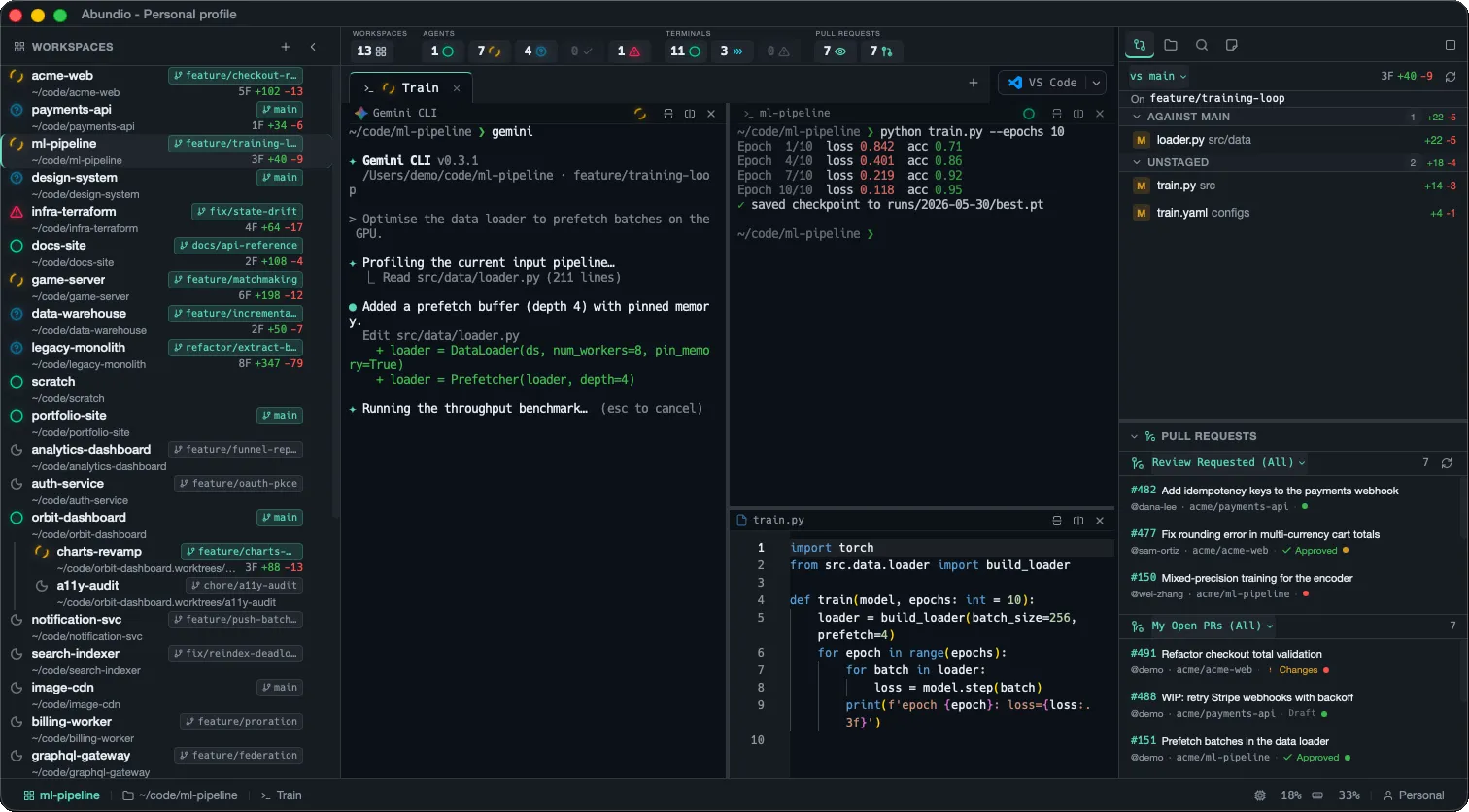
Your whole workflow, in one window.
Terminals, agents, code, git, notes, and search — scoped to the project you're working on, so you stop hopping between apps and start shipping.
-
GPU-accelerated terminals
WebGL-powered rendering via xterm.js keeps the terminal smooth even under heavy output, with a canvas fallback when needed.
-
Flexible pane management
Split horizontally and vertically with unlimited recursive nesting, organize across tabs, and switch layouts without losing your place.
-
First-class AI agents
Auto-detects installed coding agents — Claude Code, Copilot CLI, Gemini, Aider, Codex, OpenCode — or define your own custom agents, all with live activity status beside your shell.
-
Editor & file explorer
A Monaco-powered editor, a tree-view explorer with Nerd Font icons, image preview, and clickable file links straight from terminal output.
-
Git, GitHub & worktrees
A changed-files panel, branch selector, inline diff viewer, and a GitHub PR panel for reviewing open pull requests. Worktrees of a repo are grouped in the sidebar — create or remove them in-app on any branch, with optional per-repo setup commands run automatically.
-
Workspaces & profiles
Bind workspaces to project folders, persist pane layouts and scrollback across sessions, and group projects into named profiles.
-
Markdown & notes
Live side-by-side markdown preview with Mermaid diagrams, plus a per-workspace notes editor for capturing ideas and context.
-
Full-text search
Search across every file in the project with cancellation support, then jump straight to files and definitions from the results.
Your entire fleet, one glance away.
Pinned across the top of every Abundio window, the Overview bar rolls up live counts from every workspace — agents mid-turn, terminals running a command, PRs waiting on your review — so you always know where to look next without digging through tabs.
Live preview — every tile animates exactly as it does in the app.
-
Workspaces
How many of your folder-bound workspaces are open right now, out of the total in the sidebar.
-
Agents
Every coding agent’s live state — idle, working, waiting on you, ready to review, or errored — summed across all workspaces.
-
Terminals
Shell panes at a glance: at rest, running a command, or exited with an error.
-
Pull requests
Account-wide GitHub counts — PRs awaiting your review, and your own still open.
Every project, one click away.
The left rail lists every workspace in your profile — each bound to a folder. A live status dot rolls up its agents, the git branch and diff ride alongside, and worktrees of the same repo cluster together automatically. Pick one and you’re back in its panes instantly.
Live preview — status dots animate and the active workspace cycles, just like the app.
-
Folder-bound
Each workspace is pinned to a project folder. Click one to jump straight back to its panes, tabs, and scrollback.
-
Live status
A coloured dot per workspace rolls up its agents — idle, working, waiting, ready, or errored — so you see activity without opening it.
-
Git, inline
Current branch and the diff stat (files changed, lines added / removed) ride along on every row, updated live.
-
Worktree sets
Worktrees of one repo are detected from git and clustered on a shared rail — primary first, linked branches indented beneath.
Every change, diffed inline.
The Git changes tab tracks your working tree live — files grouped by staged, unstaged, and untracked, each with its own diff stat. Click one for a full inline diff, and compare against whatever base branch you pick.
export async function handleWebhook(req: Request) { const body = await req.json(); const raw = await readRawBody(req); if (!verifySignature(req, raw)) { return new Response("bad signature", { status: 401 }); } const event = parseEvent(raw); return dispatch(event); } export function signToken(user: User) { return jwt.sign({ id: user.id }, SECRET); return jwt.sign({ id: user.id, role: user.role }, SECRET, { expiresIn: "15m", }); } import { handleWebhook } from "./webhook"; test("rejects unsigned payloads", async () => { const res = await handleWebhook(unsigned()); expect(res.status).toBe(401); }); Live preview — the open file and its diff cycle automatically; hover to pause.
-
Grouped by state
Changes split into Staged, Unstaged, and Untracked — or against any base branch — each section carrying its own +/− tally.
-
Status at a glance
A colour-coded badge per file (M, A, D, R, U) with live added / removed line counts, no terminal required.
-
Inline diffs
Click any file for a full Monaco diff with syntax highlighting and a one-click toggle to hide unchanged regions.
-
Pick your base
Compare your working tree against the branch you choose — auto-detected, or set explicitly with the vs selector.
Your review queue, always in view.
Anchored beneath the sidebar tabs, the Pull requests section keeps two live lists — PRs awaiting your review and your own open PRs — across every repo you work in. Review decisions and CI status show inline and refresh as they change, so nothing slips.
Live preview — the lists refresh on a timer and CI checks land as they pass; hover to pause.
-
Review queue
Every PR across your repos that's waiting on your review, in one always-on list — no browser tab required.
-
Your open PRs
A second panel tracks the PRs you've opened, so you can see what's still in flight at a glance.
-
Status, live
Review decision (approved / changes) and the CI rollup (passing, failing, pending) show inline and refresh as they land.
-
Scope it
Flip each panel between every repo you touch and just the active workspace's repo with the view selector.
Dark, light, and then some.
Abundio ships a polished dark and light theme — and seventeen more. One pick re-skins the entire app: sidebar, editor, and the terminal’s true-colour palette, live and per-window. Flip the switch, or try any of them below.
➜ api-gateway git:(main) npm test
✔ auth.service.spec.ts (12 tests)
✔ webhook.spec.ts (8 tests)
✗ rate-limit.spec.ts (1 failed)
warning retries exceeded threshold
● coverage 94.2% +1.3%
➜ api-gateway ▋Live preview — dark and light auto-cycle; click the switch or any swatch to take over.
-
Dark or light
A polished Abundio Dark and Abundio Light, swapped in a single click — or anything in between.
-
19 built-in themes
Twelve dark and seven light presets — Dracula, Tokyo Night, Gruvbox, Nord, Solarized, Catppuccin and more.
-
Everything themed
One pick drives the whole app: UI chrome, the Monaco editor, and the terminal's true-colour ANSI palette, in sync.
-
Instant, per-window
Switch from Settings and it applies live across every pane — no restart, and each window remembers its own.
An abundance of agents,
side by side.
The name comes from the Latin abundō — “to overflow, abound.” Run Claude Code, Copilot, Gemini and more as parallel tabs — each auto-detected, each with a live status dot, so you can see at a glance which is working, waiting on you, done, or stuck.
~/code/acme-web ❯ claude ✻ Claude Code v2.0.14 /Users/demo/code/acme-web · feature/checkout-redesign > Refactor the checkout flow to validate the cart total before submitting the payment intent. ✻ Reading the current checkout implementation… ⎿ Read src/api/checkout.ts (148 lines) ● I'll add a guard that rejects mismatched totals. + if (computedTotal !== payload.total) { + throw new CheckoutError("cart_total_mismatch"); + } ✻ Validating the change… (esc to interrupt)~/code/payments-api ❯ copilot ● GitHub Copilot CLI /Users/demo/code/payments-api · main > Add retry-with-backoff to the Stripe webhook handler. ● Wrapped the handler in exponential-backoff retry (5 attempts, 200ms base) + a dead-letter log on exhaustion. Edited src/webhooks/stripe.ts (+34 −6) Ran tests: 24 passed ✓ Done. Anything else? ▋~/code/ml-pipeline ❯ gemini ✦ Gemini CLI v0.3.1 /Users/demo/code/ml-pipeline · feature/training-loop > Optimise the data loader to prefetch batches on the GPU. ✦ Profiling the current input pipeline… ⎿ Read src/data/loader.py (211 lines) ● Added a prefetch buffer (depth 4), pinned memory. + loader = DataLoader(ds, num_workers=8, pin_memory=True) ✦ Running the throughput benchmark… (esc to cancel)~/code/game-server ❯ opencode ● OpenCode /Users/demo/code/game-server · feature/matchmaking > Implement matchmaking by skill rating. ● Adding an Elo-based matcher… internal/match/elo.go (+88 −0) Running go test ./internal/match/… ok game-server/internal/match 0.214s ● Wiring the matcher into the lobby loop… (working)~/code/infra-terraform ❯ codex Codex · o4-mini > Migrate the VPC module to the new AWS provider. ● Rewriting modules/vpc/main.tf … Running terraform init ✗ Error: provider aws requires version >= 5.0, found 4.67.0 — terraform init failed (exit 1) The migration needs the provider pinned to ^5.0 first.~/code/acme-web ❯ git status -sb## feature/checkout-redesign…origin M src/api/checkout.ts M src/components/Cart.tsx ~/code/acme-web ❯ ▋Built with
- Tauri v2
- Rust
- React 19
- xterm.js
- Monaco
- Tailwind v4
Run an abundance of work.
Free and open source. Download the desktop app for macOS, Windows, or Linux — or dive into the source on GitHub.