
An abundance of productivity.
Abundio is a home base for project-centric, AI-assisted development — run your shells, your editor, your git workflow, and your coding agents side by side, all scoped to the project you're working on.
- macOS · Windows · Linux
- Native desktop, built with Tauri
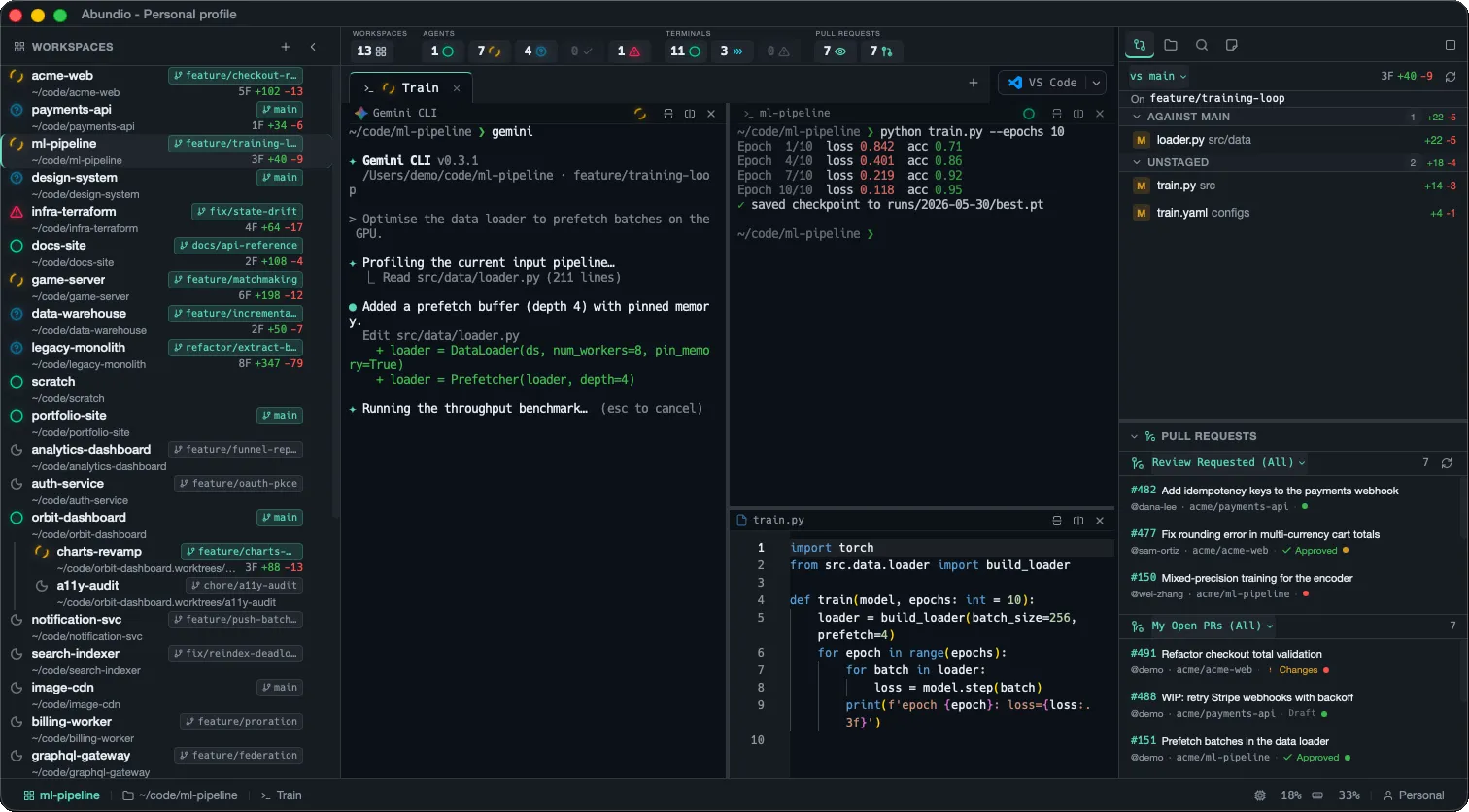
Your whole workflow, in one window.
Terminals, agents, code, git, notes, and search — scoped to the project you're working on, so you stop hopping between apps and start shipping.
-
GPU-accelerated terminals
WebGL-powered rendering via xterm.js keeps the terminal smooth even under heavy output, with a canvas fallback when needed.
-
Flexible pane management
Split horizontally and vertically with unlimited recursive nesting, organize across tabs, and switch layouts without losing your place.
-
First-class AI agents
Auto-detects installed coding agents — Claude Code, Copilot CLI, Gemini, Codex, OpenCode, Qwen Code, Kimi Code, Grok Build, Mistral Vibe — or define your own custom agents, all with live activity status beside your shell.
-
Fleet Console
Every agent in every open workspace, in one live grid. Tiles are the real terminals — answer a waiting agent, fire a prompt, spotlight one, or start a new agent in any workspace without leaving it. ⌘⇧A toggles it.
-
New task
Describe a task or pick an open GitHub issue, and Abundio starts an agent on it with the prompt already sent — in its own git worktree on a branch named after the issue, in a new tab, or in an agent that's already open.
-
Prompt actions
Turn the prompts you send most into numbered buttons under every agent pane. Leave {{placeholders}} in a prompt and Abundio asks for the values first; fire with a click, ⌘1–⌘9 or the command palette.
-
Editor & file explorer
A Monaco-powered editor, a tree-view explorer with Nerd Font icons, image preview, and clickable file links straight from terminal output.
-
Git, GitHub & worktrees
A changed-files panel, branch selector, inline diff viewer, and a GitHub PR panel for reviewing open pull requests. Worktrees of a repo are grouped in the sidebar — create or remove them in-app on any branch, with optional per-repo setup commands run automatically.
-
Workspaces & profiles
Bind workspaces to project folders, persist pane layouts and scrollback across sessions, and group projects into named profiles.
-
Encrypted environment variables
Per-workspace environment bundles sealed with AES-256-GCM under a key in your OS keychain. One bundle is injected into every terminal in the workspace; the rest reach a single command through abundio-env run. Import an existing .env file, then delete it off disk.
-
Markdown & notes
Live side-by-side markdown preview with Mermaid diagrams, plus a per-workspace notes editor for capturing ideas and context.
-
Full-text search
Search across every file in the project with cancellation support, then jump straight to files and definitions from the results.
Your entire fleet, one glance away.
Pinned across the top of every Abundio window, the Overview bar rolls up live counts from every workspace — agents mid-turn, terminals running a command, PRs waiting on your review — so you always know where to look next without digging through tabs.
Live preview — every tile animates exactly as it does in the app.
-
Workspaces
How many of your folder-bound workspaces are open right now, out of the total in the sidebar.
-
Agents
Every coding agent’s live state — idle, working, waiting on you, ready to review, or errored — summed across all workspaces.
-
Terminals
Shell panes at a glance: at rest, running a command, or exited with an error.
-
Pull requests
Account-wide GitHub counts — PRs awaiting your review, and your own still open.
Every agent, one screen.
Running agents across five projects? One shortcut lays them all out in a live grid — every workspace, every tab. Watch them work, answer the one that's waiting, and start the next one without leaving it.





Moving around the grid never rearranges your workspaces — only Switch to does.
-
Every agent, live
Press ⌘⇧A (Ctrl+Shift+A on Windows and Linux) and every agent in your open workspaces lines up in one grid. Tiles are the real terminals, not previews: type into them, answer questions and fire Prompt actions right there.
-
Your grid, your size
Pick columns × rows or let Auto decide, then drag the dividers. More agents add rows, so none is ever hidden. Tile zoom shrinks the font, not the picture — text stays sharp and the agent reflows to fit.
-
Spotlight
Double-click a tile's title bar, or press ⌘⇧Enter, to give one agent most of the screen at full size. The rest stay live in a strip beside it, so you can still answer them.
-
Start or bring back
Add agent starts a new agent in any workspace — optionally in a fresh git worktree — or a new task. Relaunch brings back the agents of a closed workspace with a fresh session. Switch to jumps to a tile's own pane.
From issue to agent in one step.
Describe a task or pick a GitHub issue, and Abundio starts an agent on it — on its own branch, in its own worktree, with the prompt already sent. No copying issue links, no setting up folders by hand.
Setup failed? The agent doesn't start — the pane says why and stays a plain shell.
-
Describe or pick
Type what needs doing, or pick one of the repo's open GitHub issues — yours are marked. For an issue, only its number and link are sent; the agent reads the issue itself.
-
A branch per task
By default each task gets its own git worktree, so agents never trip over each other. The branch is named from the issue — fix/ for a bug, feat/ for an enhancement — and your setup commands run first.
-
Or right here
Prefer to stay put? Start the task in a new tab, or restart an agent that's already open. Abundio asks first if that agent is still busy.
-
Your wording
Two templates in Settings wrap every task before it's sent, with {{input}} for a described task and {{number}}, {{title}} and {{url}} for an issue. Open it with ⌘⇧T (Ctrl+Shift+T), the palette or the Fleet Console.
Every project, one click away.
The left rail lists every workspace in your profile — each bound to a folder. A live status dot rolls up its agents, the git branch and diff ride alongside, and worktrees of the same repo cluster together automatically. Pick one and you’re back in its panes instantly.
Live preview — status dots animate and the active workspace cycles, just like the app.
-
Folder-bound
Each workspace is pinned to a project folder. Click one to jump straight back to its panes, tabs, and scrollback.
-
Live status
A coloured dot per workspace rolls up its agents — idle, working, waiting, ready, or errored — so you see activity without opening it.
-
Git, inline
Current branch and the diff stat (files changed, lines added / removed) ride along on every row, updated live.
-
Worktree sets
Worktrees of one repo are detected from git and clustered on a shared rail — primary first, linked branches indented beneath.
Your .env files, off disk.
Infostealer malware globs for **/.env and ships whatever it finds. Abundio keeps
those values in encrypted per-workspace bundles instead — one injected into every terminal you
open there, the rest handed out a command at a time. docker compose up still just
works.
Protects the values at rest — not from a process already running as you.
-
Encrypted at rest
Values are sealed with AES-256-GCM under a key held in your OS keychain, so a stray backup or a copied database yields ciphertext. Names stay readable, so the list renders without unlocking anything.
-
Injected or on-demand
One bundle can land in every terminal you open in the workspace. Every other bundle stays out of process environments entirely, and reaches a command only through abundio-env run.
-
Import your .env
Point it at an existing .env file or paste the contents — all-or-nothing, so a malformed line can't leave you half-migrated. Then delete the file off disk.
-
Worktrees inherit
A linked git worktree picks up its main worktree's bundles by name, and a same-named variable of its own overrides the inherited value without touching the parent.
Your best prompts, one click away.
Every agent pane gets a row of buttons for the prompts you send most. Leave blanks in a prompt
with {{placeholders}}, and Abundio asks you to fill them in before it sends.
Paused while the agent asks for permission — a click never answers a question you didn't read.
-
One click sends
Save the prompts you keep retyping as buttons under every agent pane. A click pastes the prompt and submits it. Option-click stages it in the prompt box instead, so you can add a line first.
-
Blanks become fields
Write {{path}} in the prompt and Abundio asks for it before sending. Fields can be text, a number, a fixed list of choices, an on/off toggle or a file. Leave an optional one empty and it drops out of the sentence cleanly.
-
Numbered keys
The first nine buttons fire with ⌘1–⌘9 on macOS, or Ctrl+Shift+1–9 on Windows and Linux — keys no terminal program can see. The command palette lists every action for the focused agent.
-
Per agent
Slash commands differ between agents, so an action can be offered to Claude Code only, to a chosen set, or to every agent — including ones you add later.
Every change, diffed inline.
The Git changes tab tracks your working tree live — files grouped by staged, unstaged, and untracked, each with its own diff stat. Click one for a full inline diff, and compare against whatever base branch you pick.
export async function handleWebhook(req: Request) { const body = await req.json(); const raw = await readRawBody(req); if (!verifySignature(req, raw)) { return new Response("bad signature", { status: 401 }); } const event = parseEvent(raw); return dispatch(event); } export function signToken(user: User) { return jwt.sign({ id: user.id }, SECRET); return jwt.sign({ id: user.id, role: user.role }, SECRET, { expiresIn: "15m", }); } import { handleWebhook } from "./webhook"; test("rejects unsigned payloads", async () => { const res = await handleWebhook(unsigned()); expect(res.status).toBe(401); }); Live preview — the open file and its diff cycle automatically; hover to pause.
-
Grouped by state
Changes split into Staged, Unstaged, and Untracked — or against any base branch — each section carrying its own +/− tally.
-
Status at a glance
A colour-coded badge per file (M, A, D, R, U) with live added / removed line counts, no terminal required.
-
Inline diffs
Click any file for a full Monaco diff with syntax highlighting and a one-click toggle to hide unchanged regions.
-
Pick your base
Compare your working tree against the branch you choose — auto-detected, or set explicitly with the vs selector.
Your review queue, always in view.
Anchored beneath the sidebar tabs, the Pull requests section keeps two live lists — PRs awaiting your review and your own open PRs — across every repo you work in. Review decisions and CI status show inline and refresh as they change, so nothing slips.
Live preview — the lists refresh on a timer and CI checks land as they pass; hover to pause.
-
Review queue
Every PR across your repos that's waiting on your review, in one always-on list — no browser tab required.
-
Your open PRs
A second panel tracks the PRs you've opened, so you can see what's still in flight at a glance.
-
Status, live
Review decision (approved / changes) and the CI rollup (passing, failing, pending) show inline and refresh as they land.
-
Scope it
Flip each panel between every repo you touch and just the active workspace's repo with the view selector.
Know what your agents actually did.
One keystroke (⌘⇧S) opens the Statistics overlay: local, per-turn telemetry for every agent across every workspace — how long they worked, what they changed, when you were the bottleneck — with CSV export when you want the raw rows.
Recorded locally per turn — day, month and year views, exportable as CSV.
-
Per-turn telemetry
Every agent turn — prompt to finished — is recorded locally with its working time, lines added and removed, and files touched. Nothing leaves your machine.
-
Summary cards
Day, month or year at a glance: total working time, lines changed, turn counts, how often agents blocked waiting on you, and which agent did the most.
-
Activity chart
A dense time-series of your agent activity — switch the metric between working time, turns, and lines to see when the real work happened.
-
Heatmap & streaks
An hour-by-weekday heatmap shows when you and your agents are most productive, alongside streaks, your busiest day, and your longest single turn.
Dark, light, and then some.
Abundio ships a polished dark and light theme — and seventeen more. One pick re-skins the entire app: sidebar, editor, and the terminal’s true-colour palette, live and per-window. Flip the switch, or try any of them below.
➜ api-gateway git:(main) npm test
✔ auth.service.spec.ts (12 tests)
✔ webhook.spec.ts (8 tests)
✗ rate-limit.spec.ts (1 failed)
warning retries exceeded threshold
● coverage 94.2% +1.3%
➜ api-gateway ▋Live preview — dark and light auto-cycle; click the switch or any swatch to take over.
-
Dark or light
A polished Abundio Dark and Abundio Light, swapped in a single click — or anything in between.
-
19 built-in themes
Twelve dark and seven light presets — Dracula, Tokyo Night, Gruvbox, Nord, Solarized, Catppuccin and more.
-
Everything themed
One pick drives the whole app: UI chrome, the Monaco editor, and the terminal's true-colour ANSI palette, in sync.
-
Instant, per-window
Switch from Settings and it applies live across every pane — no restart, and each window remembers its own.
An abundance of agents,
side by side.
The name comes from the Latin abundō — “to overflow, abound.” Run Claude Code, Copilot, Gemini and more as parallel tabs — each auto-detected, each with a live status dot, so you can see at a glance which is working, waiting on you, done, or stuck.
~/code/acme-web ❯ claude ✻ Claude Code v2.0.14 /Users/demo/code/acme-web · feature/checkout-redesign > Refactor the checkout flow to validate the cart total before submitting the payment intent. ✻ Reading the current checkout implementation… ⎿ Read src/api/checkout.ts (148 lines) ● I'll add a guard that rejects mismatched totals. + if (computedTotal !== payload.total) { + throw new CheckoutError("cart_total_mismatch"); + } ✻ Validating the change… (esc to interrupt)~/code/payments-api ❯ copilot ● GitHub Copilot CLI /Users/demo/code/payments-api · main > Add retry-with-backoff to the Stripe webhook handler. ● Wrapped the handler in exponential-backoff retry (5 attempts, 200ms base) + a dead-letter log on exhaustion. Edited src/webhooks/stripe.ts (+34 −6) Ran tests: 24 passed ✓ Done. Anything else? ▋~/code/ml-pipeline ❯ gemini ✦ Gemini CLI v0.3.1 /Users/demo/code/ml-pipeline · feature/training-loop > Optimise the data loader to prefetch batches on the GPU. ✦ Profiling the current input pipeline… ⎿ Read src/data/loader.py (211 lines) ● Added a prefetch buffer (depth 4), pinned memory. + loader = DataLoader(ds, num_workers=8, pin_memory=True) ✦ Running the throughput benchmark… (esc to cancel)~/code/game-server ❯ opencode ● OpenCode /Users/demo/code/game-server · feature/matchmaking > Implement matchmaking by skill rating. ● Adding an Elo-based matcher… internal/match/elo.go (+88 −0) Running go test ./internal/match/… ok game-server/internal/match 0.214s ● Wiring the matcher into the lobby loop… (working)~/code/infra-terraform ❯ codex Codex · o4-mini > Migrate the VPC module to the new AWS provider. ● Rewriting modules/vpc/main.tf … Running terraform init ✗ Error: provider aws requires version >= 5.0, found 4.67.0 — terraform init failed (exit 1) The migration needs the provider pinned to ^5.0 first.~/code/docs-portal ❯ kimi ◆ Kimi Code v1.2.0 /Users/demo/code/docs-portal · feature/search > Add full-text search across the docs pages. ◆ Indexed 214 pages with minisearch, wired the search box. src/search/index.ts (+126 −0) ? Allow write to src/components/SearchBox.tsx? [y] allow [n] deny [a] always ▋~/code/mobile-app ❯ grok 𝕏 Grok Build · grok-4 /Users/demo/code/mobile-app · fix/push-badges > Fix the unread badge count drifting after background sync. ● The badge was incremented per notification instead of recomputed — switched to deriving it from the unread query. src/notifications/badge.ts (+18 −11) ✓ Done. Tests green (17 passed). ▋~/code/acme-web ❯ git status -sb## feature/checkout-redesign…origin M src/api/checkout.ts M src/components/Cart.tsx ~/code/acme-web ❯ ▋Built with
- Tauri v2
- Rust
- React 19
- xterm.js
- Monaco
- Tailwind v4
Run an abundance of work.
Free and open source. Download the desktop app for macOS, Windows, or Linux — or dive into the source on GitHub.